

TL;DR
Minimise Tokens
Every token costs money – send the fewest necessary in prompts, and cap model outputs.
Reuse & Cache
Don’t repeat yourself – cache identical or similar queries and avoid re-sending static context.
Plan & Monitor
Treat AI usage as a FinOps priority – set budgets, pick the right model for each job, and track token usage continuously.
I recently came across this fantastic blog article written by software developer Rost Glukhov, with some incredibly easy to follow ideas and explainations and it got me thinking of how do we all follow some guidelines around ensuring we introduce a framework form seeking Cost efficiencies in AI workloads. Read the full article here: https://www.glukhov.org/post/2025/11/cost-effective-llm-applications/
I also have found the following article from Finout incredibly useful and have drawn some great ideas and thoughts from here: https://www.finout.io/blog/openai-cost-optimization-a-practical-guide
I have used this and other articles referenced below to try and start thinking about a framework for helping folks know where to start when it comes to FinOps in AI development. SO with a bit of structure and CoPilot assistance I have filtered it down to a fairly comprehensive state of play for todays climate. Its a work in Progress but I would love to hear your ideas and own experiences.
Whitepaper – Preface
Generative AI platforms like Azure AI Foundry offer powerful Large Language Models (LLMs) and related models to build AI-infused applications. But with great power comes great cost: these models charge per token (pieces of text) processed, which can add up quickly in production. This article presents 10 practical strategies to predict, manage, and optimise costs for LLM/“Agentic AI” applications on Azure – without sacrificing functionality or user experience. It’s written for a mixed audience of developers, technical teams, and business/FinOps stakeholders, so we’ll cover both the how-to details and the big-picture practices.
We keep Azure AI Foundry (Azure’s platform for deploying OpenAI models and more – around 11,000 to give it a number) as the focal point, but many principles apply equally to other cloud platforms (like AWS Bedrock or Google Vertex AI). By the end, you should have a clear idea of how to design and run AI-powered apps that deliver value without breaking the bank, plus a handy checklist summarising the key tactics. [finout.io]
Let’s dive into the key areas:
1. Understanding How LLM/SLM Costs Accrue
Know your costs drivers: Most AI cloud services (Azure OpenAI, OpenAI API, AWS, GCP, etc.) use a token-based pricing model: you pay for the text you send into the model (prompt tokens) and the text it outputs. For example, with OpenAI models hosted on Azure, you might pay around $0.0005 per 1K input tokens and $0.0015 per 1K output tokens for a GPT-3.5 model, but GPT-4 costs dramatically more – on the order of $0.01 per 1K input and $0.03 per 1K output tokens. In other words, model choice hugely impacts cost: a large “frontier” model can be 10×–20× more expensive per token than a smaller model. (One team discovered they’d been using GPT-4 for a simple task that GPT-3.5 could handle at 1/15th the cost!) [abhishek.cloud][glukhov.org][finout.io]
Input vs Output: A common surprise is that input tokens can end up costing more than output for a given request – not because they’re individually pricier (in fact, output tokens often have a higher unit price), but because we sometimes send a lot of prompt text to get a relatively short answer. For instance, if you feed a 1000-token instruction into GPT-4 and get a 100-token answer, the majority of that call’s cost came from the prompt. Many teams inadvertently waste budget by including overly verbose instructions or unnecessary context in every call. Conversely, letting the model generate unbounded lengthy responses can also blow up costs. The key is to understand each token = money. Figure 1 illustrates how the cost per 1K tokens jumps between a cheaper model and an expensive one – this gap multiplied by thousands of tokens and many requests is why optimising is so important. [finout.io]
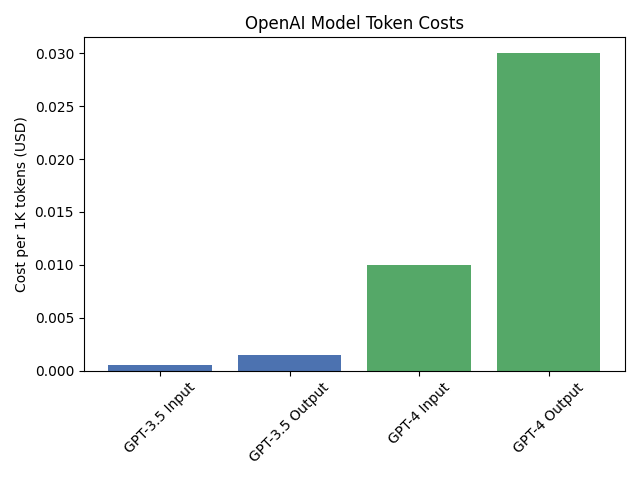
Figure 1: OpenAI model token costs per 1K tokens: GPT-3.5 vs GPT-4 (illustrative). Smaller models are orders of magnitude cheaper per token than large ones.[glukhov.org]
Fine-tuning and hosting overhead: If you fine-tune a model on Azure, note that cost isn’t purely per-use; there are separate charges for training and even for hosting the fine-tuned model instance (you pay for the reserved capacity whether it’s used or not). This means a poorly utilised fine-tuned model can incur cost without delivering value – so use fine-tuning judiciously unless you have steady high volume inference to justify it. [finout.io]
Overall, start by making cost visible: make sure you tag or segregate usage by feature/team from day one, and use Azure’s Cost Management reports to see where the tokens (and money) are going. Understanding if most of your spend is coming from one expensive model, or from prompt bloat, etc., will inform which optimisations to focus on. [finout.io], [finout.io]
2. Prompt Engineering for Cost Efficiency
Prompt engineering isn’t just about getting better model outputs – it’s also one of your first lines of defence for cost control. Every unnecessary token in a prompt is literally a needless expense. Adopting a “minimal viable prompt” mindset can often cut prompt size (and cost) by 70% or more with no loss in output quality. In practice, this means: [glukhov.org], [glukhov.org]
- Eliminate fluff and redundancy: Ensure your instructions and user queries are as concise as possible without being ambiguous. Don’t repeat the same guidance in every prompt if not needed. Developers sometimes write prompts like they’re prose – “You are a helpful assistant, please do X, here is some background, now please do X” – when a simple direct instruction would do. For example, changing a verbose instruction “Please analyze the following text and provide a detailed summary of all key points” to “Summarise this text – key points only.” shortened one prompt from ~700 tokens to ~200 tokens with no change in result, yielding about 71% cost savings per request. [finout.io], [finout.io]
- Structured formats over free-form text: You can often reduce the token count and help the model focus by using structured prompts or outputs. For instance, instead of saying “provide me the information clearly”, explicitly ask for a formatted answer: “Output JSON with keys: name, age, occupation.” This avoids extra verbiage in the response. Structured or bullet-point prompts remove the linguistic padding and get the model to be terse. A JSON or list output uses far fewer tokens than a full narrative paragraph while conveying the same facts. [glukhov.org], [glukhov.org]
- Token-budget mindset: Think of your prompt as if you were paying by the word (because you are!). Set a rough token “budget” for each part of your prompt. If you find yourself writing paragraphs of system message or example, ask whether those 500 extra tokens are really pulling their weight in improved accuracy. Often, they’re not – or there’s a cheaper way to achieve the same result (e.g. via fine-tuning or by supplying a shorter hint). One rule of thumb: if your system prompt looks like an essay, you’re probably overspending. Aim for the smallest effective prompt. In practice, teams that rigorously optimize prompts have significantly cut costs without degrading the AI’s performance. [finout.io], [glukhov.org]
- Few-shot vs. zero-shot trade-off: Providing examples in the prompt (few-shot learning) can dramatically improve quality on some tasks, but examples are token-heavy. Try to use the minimum number of examples necessary – often 1–2 good examples works as well as 5–10 examples. Keep example texts short and omit irrelevant parts. If you only need a pattern, you can even use dummy placeholders instead of real long text in your examples to save space, as long as the pattern is clear. Always weigh the cost: is this example adding enough value to justify its tokens? [glukhov.org]
In short, prompt text is a cost vector you control. By engineering prompts to be lean and efficient, you directly control your spend. One FinOps guide put it succinctly: “Design instructions that do the job with the fewest tokens” – it’s good for the model’s clarity and your budget. [finout.io]
3. Input Caching and Semantic Reuse
Sometimes the cheapest token is the one you don’t have to send at all. If your application sees the same (or very similar) queries repeatedly, you should not be paying twice for the model to answer them. This is where caching comes in – a huge win for cost reduction in many production systems.
There are a few layers to caching strategy:
- Provider-side caching of prompts: Azure AI Foundry (and underlying OpenAI service) can automatically detect when a large prompt prefix repeats across requests and may apply an internal cache so it doesn’t fully bill you each time. For example, OpenAI has disclosed that if you repeatedly send the exact same 2,000-token system message at the start of many requests, they cache it for a short time – subsequent requests within ~5-60 minutes don’t incur the full cost of those tokens, resulting in 50–90% lower charge for the cached portion. Azure’s platform can take advantage of this for stable prefixes (like a long policy or instructions blob). The key is that the content must be identical and above a certain length to trigger caching, and it only lasts a limited time window. While you can’t directly control this caching, knowing about it helps: if you have bulky static context, keep it identical each time (don’t add meaningless random bits), so that the service might cache it and save you money automatically. [glukhov.org][glukhov.org], [glukhov.org]
- Application-level prompt caching: The more straightforward approach is for your application to cache and reuse results of prompts. If user A asks “What is the refund policy?” and user B asks the same thing an hour later, your system should ideally detect that and return the answer from cache instead of calling the model again. Even for semantically similar queries (e.g. “How do refunds work?” is basically the same question), you can use embeddings to catch paraphrases. A common pattern is to store a mapping of question → answer for answered queries, and on each new query, compute an embedding and do a similarity search against past questions. If you find a match above some similarity threshold, you can serve the cached answer (maybe with a note that it’s a stored response). This approach has been shown to yield major savings: one fintech company implemented an embedding-based “semantic cache” and achieved about a 62% cache hit rate, cutting total token usage by ~40%. Even a simpler exact-match cache is worthwhile – one SaaS team that cached ~10% of repeat requests saved ~$4,000 per month with no model calls for those. [finout.io]
- Response caching with TTL: When caching at application level, it’s wise to give cached answers an expiry (depending on how fast information changes) and a way to invalidate if needed. But many answers (especially those based on static reference info or in a Q&A bot) can be cached for days or weeks. Tools like Redis make it easy to implement an LRU (least recently used) cache for LLM responses. Pseudocode for a cache lookup might look like: check
cache[key](where key could be something like a hash of the question + model name); if present, return cached answer; if not, call the model and then store the result in cache for next time. The overhead is low, and you’re trading a bit of storage for a lot of compute savings. [glukhov.org], [glukhov.org] - Don’t forget partial caching of static context: Even if the user’s core query is always new, many applications still send a lot of static background with each prompt (company policies, product info, etc.). Instead, consider caching the model’s answer for each document or section of context, if appropriate, or just avoid re-sending that context every time (see next section on design). Some advanced implementations chunk static info and only send relevant pieces (which effectively is a form of caching the rest).
In summary, caching is low-hanging fruit. It’s much cheaper to store and reuse an answer (or part of a prompt) than to recompute it. Make caching your default for any prompt or sub-prompt that is deterministic and repeats. Many businesses find this yields 30–50% cost reductions in real deployments. And aside from cost, caching improves latency for users, since returning a stored answer is faster than calling the model again. [finout.io]
4. Designing for Reusability and Repeatable Context
A common anti-pattern in LLM apps is to treat each interaction as isolated and stuff every prompt with the full context and instructions needed, regardless of past requests. For example, if you have a chatbot that always needs the company’s 5-page policy document to answer questions, you might be naively prepending those 5 pages on every single query – incurring that token cost each time. There’s a better way: design your system so that static or repeated context is reused or referenced, rather than re-sent every time.
Key principles for a cost-efficient design:
- Modularise your prompts: Conceptually split what you send into categories: (a) Static instructions (e.g. the role or style instructions, and any background info that applies to all users), (b) User query (the live prompt content unique to this request), and (c) Optional context (additional data pulled in if relevant). By separating these, you can avoid blindly concatenating everything. Static instructions can often be loaded once or cached (as above). Optional context can be fetched on the fly only when needed. Think of it like microservices for prompts – don’t hardcode one giant prompt if it can be broken into reusable components.
- Use vector stores and retrieval instead of long appendices: Rather than inserting a large document or knowledge base excerpt into every prompt, store your reference text in a vector database (Azure Cognitive Search, Pinecone, etc.). When a query comes in, retrieve only the most relevant chunks (say, the top 3 paragraphs that closely match the query) and inject only those into the prompt. This retrieval-augmented generation (RAG) approach dramatically lowers the amount of context tokens needed, because the model doesn’t have to see all possible information – just a distilled relevant subset. It also tends to improve accuracy, since the model focuses on pertinent info. Microsoft’s guidance highlights that using embeddings to provide semantic context “results in fewer tokens used” without compromising quality. In short, don’t feed the entire book to the model if you can just feed a single chapter. [glukhov.org], [glukhov.org][techcommun…rosoft.com]
- Avoid repetition across turns: In multi-turn conversations, you might be tempted to resend the entire conversation history or instructions each time. Instead, consider techniques like conversation state management: you can summarize previous turns or use system-level memory in Azure’s Conversation service to avoid resending everything. If the model supports a large context window, you might keep some history, but compress it when possible (e.g. the older messages summarized in one block). The goal is to not repeat large chunks of text in every prompt.
- Reusable prompt templates: If you have a particular system message or format that is used in many places, keep it as a template string and programmatically insert it. This way, if you need to change it (e.g. shorten it to save tokens), you do so in one place. It also makes it easier to identify static vs dynamic parts of prompts in your codebase.
Designing with reusability in mind has multiple benefits: it lowers token usage, reduces chances for error (since you aren’t reconstructing prompts from scratch every time), and helps with maintainability (you can update instructions in one go). From a cost perspective, it ensures you’re not paying repeatedly for the same context. One tech blogger noted that “embedding the same long context into every prompt” is a major source of token waste, and the fix is to break prompts into pieces and reuse the pieces across workflows. Practically, that means e.g. don’t include the entire 500-word policy in every customer question – use a retrieval step to pull out only the clause needed for that question, or have the model recall a previous summary. Many teams have found that this modular design not only saves money, but also improves response consistency and makes it easier to update the knowledge base without changing prompt logic. [glukhov.org]
5. Model Selection Strategy: Choose the Right Model for the Task
Not every task needs a top-of-the-line, most expensive model. In fact, most workloads don’t. One of the biggest cost levers you have is which model (or model size) you use for each job. The difference in cost can be dramatic: as we saw, GPT-4 can be ~20× the price of GPT-3.5 per token, and some open-source or smaller proprietary models (sometimes called SLMs – Small Language Models) are even cheaper. So the strategy is: use the smallest/cheapest model that still meets the requirements, and only “flash the cash” on a big model when absolutely necessary.[glukhov.org]
In practice, this often means implementing a model cascade or routing system. For example, you might start by attempting a user query with a lightweight model (or even a heuristic). If it’s confident or if the task is simple (like classification or a straightforward lookup), you’re done at minimal cost. If not, you escalate to a mid-tier model for a second attempt. Only for the hardest or highest-stakes queries do you call the most expensive LLM.
This approach works remarkably well. In one case study, a company built a router such that simple requests went to GPT-3.5 and only complex ones went to GPT-4; they ended up sending 82% of requests to the cheaper model and maintained the same service quality, which saved about $7k per month at their scale. Similarly, another team reported that by directing ~80% of chatbot queries to GPT-3.5 and only 20% to GPT-4, they reduced overall cost by 75% compared to using GPT-4 for everything. These are massive savings for a small change – users usually didn’t even notice a difference, because the answers were nearly as good or the slight quality trade-off was on inconsequential queries. [finout.io], [finout.io][glukhov.org]
When to use which model? A sensible guideline is: start with the cheapest model that might solve the problem. For many routine tasks like summarising text, extracting keywords, classifying sentiment, or answering FAQs based on docs, the smaller GPT-3.5 (or similar) models are often more than enough. Save GPT-4 (or other expensive “frontier” models) for cases that genuinely need superior reasoning, complex dialogue, or high accuracy in an open-ended generation. Define criteria for escalation – e.g. if the user’s query is very complex or if the lower model returns a low-confidence answer or some uncertainty, then call the bigger model. This philosophy is sometimes called the “model ladder” approach, where you have tiers of models and you step up only as needed. [finout.io][glukhov.org]
Azure AI Foundry makes multiple models available (e.g. GPT-3.5, GPT-4, possibly smaller ones or fine-tuned variants). Take advantage of that instead of one-size-fits-all. Also consider fine-tuned models or Azure’s newer smaller model offerings (if any) for specialised tasks – a fine-tuned 3.5 can outperform a base 3.5 and approach a base GPT-4 on a specific task, at much lower cost per call. If you have a scenario with very repetitive structured outputs, a fine-tuned smaller model could handle it cheaply after you pay the one-time tuning cost. Just remember to terminate or scale down any fine-tuned deployments when not in use (as noted, they incur hourly costs). [abhishek.cloud][finout.io]
Lastly, keep an eye on the model landscape. New versions (like GPT-4 Turbo, etc.) often bring price reductions or higher context limits. And alternative providers (Anthropic, Cohere, etc.) might offer cheaper rates for similar performance in certain areas. Azure OpenAI allows some flexibility in model choice, and a mature strategy might even route between providers for cost (though that’s advanced). The main point: treat model selection as an architectural decision, not an afterthought. The right mix of models can dramatically optimise your cost structure while still meeting quality needs. [techcommun…rosoft.com]
6. Managing Output Efficiency (Limit Unnecessary Tokens in Responses)
We’ve talked about reducing prompt tokens, but what about the model’s output? Output tokens also cost money, and you do have some control over how verbose the model is allowed to be. It’s easy to forget to manage this – after all, you might think “if the user wants a long answer, the model will give it.” But often models will ramble or include extra content if not guided, which you then pay for. In cost terms, output tokens can be even more “expensive” since many providers charge higher rates for generation. Bottom line: proactively manage and minimize output length when possible.[glukhov.org]
Techniques to control output tokens:
- Set max_tokens parameter: Always set a sensible limit on the maximum tokens in the response. Leaving it unbounded is asking for trouble – e.g., one Azure OpenAI user reported a bot that returned a 3,000-token essay when it wasn’t necessary, racking up about $0.18 for that single response. By capping the response to, say, 300 tokens, you ensure you never pay for an overly long answer. The appropriate limit depends on your use case; it should be enough to answer the question but not so high that the model can go off on tangents. Think: does anyone need a 1000-word answer here, or is 100 words sufficient? Most platforms let you specify this max limit in the API call (e.g.
max_tokensin OpenAI API). [finout.io][glukhov.org] - Use stop sequences or tokens: Another way to cut off unnecessary output is to provide stop tokens – specific sequences where the model should stop if encountered. For example, you might instruct the model to stop when it outputs „\nEND“ or some delimiter once it’s given an answer. This prevents the model from continuing into irrelevant content beyond the answer (sometimes models will politely say “Is there anything else I can help with?” and such – which wastes tokens). [glukhov.org]
- Ask for concise formats: Guide the model’s style in your prompt. If you want a brief answer, say so! e.g. “Respond in 5 bullet points.”, or “Keep the answer under 100 words.”, or “Just give a JSON with the fields.” The model will usually comply with length and formatting instructions. Structured and terse outputs not only cost fewer tokens, but can reduce hallucinations and keep the response on-track. Be specific: “one paragraph summary” or “no additional commentary beyond the answer” are the kind of instructions that lead to tighter outputs. For instance, telling the model to answer only with a JSON object or a bullet list inherently limits verbosity. [glukhov.org]
- Avoid open-ended prompts when not needed: If your prompt is too vague, the model might generate a lot as it tries to be thorough. By contrast, a focused question yields a focused answer. So part of output control is actually prompt design (again!). E.g., ask “What are the three key points from X?” instead of “Tell me about X.” The former implies a concise answer, the latter could elicit a long essay.
- Handle long-form via iterative reveal: If you do have a case where the user might need a very long answer, consider delivering it in parts (with user permission), or using a summarization-on-demand approach. That way, the user can stop when they have enough. This is more of a UX consideration but can dovetail with cost control by not dumping huge texts when not necessary.
The impact of output management is significant: you eliminate those run-on endings and irrelevant sentences that cost tokens but add no value. Moreover, by keeping responses shorter, you may improve clarity for users. Always remember that you’re paying for every token the model says – so guide the model to say what needs to be said, and no more. In practice, teams that implemented strict output limits and concise styles have seen more predictable costs and often faster responses too (since less to generate).
As one expert put it, “Since output tokens cost 2–5× more [than input], controlling output length is critical.” It’s an easy win: set the rules for output, and you won’t be surprised by an epic response on your bill. [glukhov.org]
7. Architectural Patterns for Cost Control
Beyond prompts and models, how you design the overall system can greatly affect cost. Modern AI applications often involve multiple steps or components (think retrieval, multiple model calls, tool usage, etc.). By adopting cost-aware architectural patterns, you can make sure the system as a whole uses the expensive LLM intelligence sparingly and efficiently.
Some key patterns and principles:
- LLM as orchestrator (not sole worker): Use the LLM for what it’s best at – making decisions, interpreting user intent, or generating small amounts of critical text – and hand off other tasks to cheaper deterministic systems. For example, if a user asks, “What’s the sum of revenue in these 100 lines of data?”, an expensive approach would be to feed the entire data to the LLM and have it calculate and answer in text (costly and error-prone). A better approach is to have the LLM see the question, recognize it should do a calculation, and then have your code or a database query compute the sum, with the LLM just orchestrating this process. In other words, let the LLM call tools or trigger code for heavy lifting. Microsoft’s Azure OpenAI encourages this pattern via their Functions / Tools interface in the Chat API – the LLM decides what needs doing, but a function does it. This dramatically reduces tokens (you’re not feeding large data into the model or getting it to spell out long results). It also improves accuracy for things like math or data retrieval. In essence, the LLM becomes a controller or brain that delegates routine tasks to non-LLM components. This pattern can be seen in complex “agent” systems: rather than a single prompt to answer everything (which might involve loads of context), the agent architecture breaks the job into steps and uses additional logic to keep the LLM’s role targeted. [xenoss.io]
- Multi-step workflows and agents – but be careful: Agentic AI (where an AI agent iteratively plans and calls multiple LLMs or tools) is powerful, but it can also burn through tokens quickly if not well-managed. Each intermediate step is another prompt/response. If you adopt a multi-agent or chain-of-thought style solution, be sure to apply all the above strategies (short prompts, cheap models for intermediate steps, etc.) for each step. Logging and analyzing how many tokens a full workflow consumes is crucial – sometimes a poorly configured agent can end up using far more tokens than a single-shot solution. Many teams found that naïvely using a general-purpose agent to do a job was “too slow, expensive, and error-prone” compared to a more straightforward approach. So use agents with a clear cost/benefit analysis: they should only loop in ways that save on calling an extremely expensive model or achieve something a single call couldn’t. If an agent approach is doubling your token usage for marginal gains, rethink it. [xenoss.io]
- Retrieval-Augmented Generation (RAG) as default: We discussed RAG in context of prompt design, but as an architecture pattern it means you separate knowledge storage from the generative model. Your system uses a vector database or search index to fetch relevant facts, and the LLM only gets those facts (plus the question) to process. This should be the default for any app that has a sizable knowledge base. By doing this, you avoid needing extremely large context windows or feeding huge documents into the model. RAG can allow using a smaller model too, since the task is narrowed to synthesizing given info, not recalling from its training. Overall, it’s a cost win and often an accuracy win. Just ensure your retrieval is efficient (e.g. limit to top 3-5 docs as discussed). [glukhov.org]
- Use smaller models for intermediate steps: If you have a multi-step pipeline (for instance: classification → lookup → answer), try to use the cheapest model that can handle each step. A simple classification of user intent might be done with a very small model or even regex, rather than calling GPT-4 to figure it out. Think of it like an assembly line where the heavy-duty AI is only used where necessary. One pattern is to combine a fast cheap model with a slower expensive model in a fallback mode, as noted in the model selection section. This can be applied within a single user request as well (first attempt with cheap model, second attempt with expensive if needed).
- Batching and asynchronous processing: If you have large volumes of tasks that aren’t real-time (for example, summarising thousands of support tickets), consider using Azure’s Batch processing capabilities or doing them offline in bulk. Azure OpenAI offers a batch API that can process a file of prompts with a 50% cost reduction, albeit with higher latency (up to 24 hours). Architect your non-urgent workloads to use these batch jobs – it cuts cost in half straight away. Asynchronous design (using queues, background jobs) also allows you to use resources more efficiently; you could schedule jobs for off-peak times or ensure you maximise throughput of the model context window by packing multiple sub-tasks into one call when possible. [finout.io]
- Observability and cost monitoring built-in: Architect your system to log key metrics: number of tokens used per request, which model was used, which branch (cached or new), etc. Feed these into dashboards. You can’t optimise what you don’t measure. Azure Monitor and App Insights can track your API calls; you might also push custom metrics (like cost per user session). Set up alerts for anomalies – e.g. if one user’s session suddenly generated a 5x increase in tokens, maybe a prompt went awry in a loop. From an architecture view, treat the LLM like a dependency that needs monitoring just as you would monitor a database’s query performance. [glukhov.org], [glukhov.org]
- AI gateways and policy enforcement: In larger organisations, a pattern is emerging of an “AI gateway” – effectively a proxy that all LLM requests go through, which can enforce rules: e.g. rate limits, per-team quotas, or route requests to different models/providers based on policies. This is a governance layer (overlaps with next section) but also architecture: by centralising how requests are handled, you can optimize collectively. For instance, the gateway might automatically route any request over X tokens to a batch process or require a special API key (to prevent accidental huge prompts). It could also do things like strip or compress prompts if too large (using a compression model) – experimental, but possible. Some organisations also implement cost-based routing at this layer: if two providers have different rates or one model is cheaper but slightly lower quality, the gateway might choose the most cost-effective route that meets an acceptable quality bar for that request type. [finout.io]
To summarise, a cost-optimised architecture will leverage LLMs intelligently as part of a larger system, rather than using an LLM blindly for everything. By orchestrating workflows, using retrieval, caching, and having oversight on usage, you ensure that you only spend tokens (and money) when and where it adds real value. Architect for cost and reliability hand-in-hand – often the changes (like caching, separating concerns) benefit both. Good engineering and good FinOps go together here.
8. Governance, FinOps and Budgeting for AI Usage
Cost control isn’t purely a technical exercise – it’s also about policies, governance, and financial operations (FinOps) practices. In cloud services, it’s common to set budgets, enable chargeback, and restrict resource usage; LLM services should be treated no differently. In fact, because it’s usage-based and new to many teams, putting guardrails in place early is critical to avoid “runaway” costs or surprises.
Here are some governance and FinOps tips for AI in Azure:
- Set clear budgets and track them: Use Azure Cost Management to set a budget for your Azure OpenAI service consumption (e.g. monthly budget) and configure alerts at certain spend thresholds. This way, if costs start creeping up, you get notified when, say, 80% of budget is reached. FinOps is all about visibility – so regularly review the spend in the Azure billing reports specifically for your AI services. It can help to allocate a budget per team or project using tagging. Azure allows tagging resources or even specific API calls (via custom headers) for cost attribution. If multiple teams use the same Azure AI Foundry instance, implement a way to split out their usage (different API keys or deployment IDs per team, etc.) so you can do internal chargeback or showback. Seeing the cost per team/feature tends to incentivize optimization at the source. [abhishek.cloud][finout.io]
- RBAC and access control: Control who can deploy and use the expensive models. For instance, maybe everyone can use the GPT-3.5 deployment freely, but only certain users or a service account can call GPT-4 (and it requires justification). Azure lets you use role-based access control on resources. You could have a policy that any new model deployments or increases in quota go through an approval (much like you’d approve high-cost VM instances). This prevents an enthusiastic developer from unknowingly lighting up a very costly endpoint or integration. Also, consider disabling or constraining interactive use of the model that could generate huge outputs – e.g. if someone had direct access to the endpoint, they might accidentally prompt it with a massive input or ask for a novel-length output. Limit the parameters or expose a safer interface.
- Usage policies and education: It’s wise to create some internal guidelines for prompt usage and cost – essentially a best practices document for your devs and data scientists. Include things like token limits, when to use which model, caching expectations, etc., much of what we’ve discussed. Culturally, make cost a part of the conversation around AI features. Perhaps incorporate cost estimates into planning (e.g. “this feature is expected to use ~X tokens per run, which at current prices is $Y per 1k runs”). If you treat token usage like a shared finite resource, teams will naturally be more conscious of it.
- FinOps review cadence: Have periodic reviews of your AI cost profile. For example, each sprint or month, analyze the top cost-driving operations. Are there specific prompts or workflows that cost the most? Can they be improved? Perhaps introduce a “prompt audit” every quarter – look at the longest prompts and see if they can be trimmed, or audit if teams are inadvertently using GPT-4 by default when a cheaper model would do. Just like code review, a cost review can catch inefficiencies. Some organizations establish an AI Cost Champion role or extend FinOps team responsibilities to cover AI services usage. [finout.io]
- Leverage pricing options: Azure offers the Provisioned Throughput (PTU) mode for OpenAI, which is like reserving capacity for a flat rate. If you find your usage is very steady and high-volume, it might be cheaper to reserve PTUs for a model deployment (you pay a fixed hourly rate). However, be careful – if your usage winds up lower than expected, PTUs could end up costing more (since you pay regardless of use). This is similar to reserved instances vs pay-as-you-go in VMs. Also use the batch cost savings (50% off) for offline jobs as mentioned. Keep an eye out for any Azure cost-saving programs or quotas – sometimes Microsoft might have discounts for research or previews of new model versions. [techcommun…rosoft.com][finout.io]
- Multi-cloud/vendor strategy: This is advanced, but some FinOps mature organizations consider a multi-vendor approach – using whichever LLM service is cheaper for a given task if quality is comparable. For example, if Cohere or Anthropic offer a much cheaper model for classification, they might route those calls there, while using Azure OpenAI for other things. This requires the ability to evaluate and maintain multiple integrations, so only do this if the cost difference is significant and your team is capable of managing it. The AI landscape is evolving, so what’s cheapest today might not be tomorrow – staying somewhat vendor-agnostic can give negotiating power or flexibility. That said, consolidating on Azure has benefits (like centralized management and data compliance), so it’s a balance. [finout.io]
The overarching theme is to treat AI usage with the same rigor as any cloud resource. Establish cost controls, monitor actively, and enforce policies to avoid waste. If many teams are experimenting, set ground rules early – it’s much easier to relax a policy later than to reel in usage after habits form. One FinOps specialist noted: “Introduce governance early — don’t wait until you’ve built an expensive habit.” This rings true: get ahead of the cost curve by design.
In essence, AI projects need FinOps from day one. By doing the above, you ensure cost accountability and prevent nasty surprises when the invoice arrives. Finance folks will thank you, and it will sustain your ability to keep investing in AI by demonstrating ROI.
9. Developer Tooling & Automation to Control Spend
Just as we have linters and tests to catch code issues early, we can use tools to catch costly AI usage patterns early in development. The goal here is to bake cost-awareness into the development lifecycle so that individual developers don’t have to manually police every prompt or usage – the tools and automation help enforce the best practices.
Some effective approaches:
- Token/count and cost feedback in IDE: Developers writing prompts or designing conversations can benefit from real-time feedback on token counts. There are extensions (for example, Tokenlint for VS Code) that can show the token length of your prompt and even estimate the cost for different models as you type. These provide visual warnings when a prompt is getting too long or nearing model limits. Using such tools encourages developers to shorten prompts and consider cost from the start, rather than discovering issues later. It’s analogous to how seeing linter warnings in code will prompt a fix before a review. [tokenlint.com], [tokenlint.com][tokenlint.com]
- Prompt linters and validators: Aside from counting tokens, one can create a “prompt lint rule set” – e.g., flag if a prompt has more than N characters, or if it contains a deprecated pattern (like including an entire document). Some open-source projects and libraries (e.g.,
promptlinton PyPI) are emerging to analyze prompts for quality and cost issues. Integrate these into your CI pipeline. For instance, you could have a unit test that iterates over your prompt templates and ensures none exceed, say, 300 tokens. Or if a developer added a new system prompt that’s extremely verbose, a CI check can fail and point it out. - Automate model routing logic: We discussed model selection – you can implement that logic in a module such that developers don’t individually decide which model to call each time. For example, provide a function like
callAI(question)that internally routes to the appropriate model based on complexity or other rules. This not only abstractly optimizes cost, but also prevents “rogue” usage of expensive models because the common function can enforce the policy. Rost Glukhov’s example showed a simple routing function by task complexity. In your case, it could be based on prompt length or user segment, etc. The key is developers then use the high-level API and the system optimises underneath. [glukhov.org] - Automate prompt sizing and chunking: If you have inputs that could be arbitrarily long (like user pasted text), write utility functions that automatically chunk or truncate inputs to a safe token length for the model. This way a developer can call
summarize(longText)and your library will handle slicing it into multiple requests or summarizing progressively, rather than leaving it to each one to solve (and possibly do so in a way that leads to huge token counts). This prevents accidental super-long prompts. - Continuous monitoring and alerts in dev/test: It’s a good idea to test how your application behaves with regard to token usage. Incorporate some scenario tests that simulate typical and maximum expected inputs and measure the tokens consumed (the OpenAI API returns usage info in the response which you can log). If a change in code causes a large spike in tokens for the same test input, that should alert the team. Essentially, treat an unexpected increase in token consumption like a performance regression. You can even fail a build or deployment if a certain threshold is exceeded, pending investigation.
- Dashboard and analytics for developers: Provide your dev team with easy access to usage analytics. Instead of waiting for a monthly finance report, developers can have a Grafana dashboard (for example) that shows requests per hour, tokens per request, cache hit rates, etc., in near real-time. This helps them self-service identify inefficiencies. For instance, if they deploy a new feature and see the average tokens per request doubled, they can immediately go optimize that feature’s prompts rather than finding out much later. [finout.io]
- Cost-aware testing/staging: If you have a staging environment, you might use a cheaper model there to reduce cost during testing. Or implement a “dry-run” mode of the AI calls where, in test, it doesn’t actually call the LLM but perhaps uses a stub or returns a shortened answer – just to avoid incurring cost. Be careful though: you still want to test with the real model enough to ensure quality.
- Alerts for anomalies: Automate what a FinOps person might do manually. For example, if daily cost exceeds X, automatically send a Slack message to the team with a breakdown of usage (this can be done via Azure Monitor alert triggers or a simple script using the billing API). Or if one user seems to be calling the API way more than usual (maybe a bug causing a loop), send an alert or even throttling. Basically let the system watch for obvious signs of runaway usage and flag them immediately. [glukhov.org]
The aim of all these measures is to prevent costly mistakes and drifts proactively. Humans are fallible; we might write a prompt that’s too long without realizing, or default to a more powerful model out of convenience. Tooling and automation can catch those and either warn or outright stop them from going live. Over time, it also educates the team by making cost considerations a natural part of development.
As an analogy, think of how we use automated tests to ensure code quality – use automated cost checks to ensure “cost quality”. By integrating these into your development workflow, you create a culture where efficiency is part of the definition of done.
10. Key Business Outcomes of Prompt Efficiency and Cost Optimisation
Why all this effort on optimisation? Because the payoff is substantial. By investing in efficient prompts and smart cost management, businesses can achieve meaningful ROI improvements and enable use cases that would otherwise be prohibitively expensive. Let’s highlight a few outcomes:
- Dramatic cost savings: Organizations that systematically apply the techniques above often see **30%–70% reduction in LLM usage costs】 (and some report even up to 80% in extreme cases). This isn’t a one-time cut – it’s a new baseline that continues going forward, meaning those savings compound as usage grows. For example, if your AI features cost $10k/month and you cut 50%, that’s $60k saved in a year, which could fund other projects or improve your margins. Cost-efficient prompts essentially let you do more with the same budget. [glukhov.org]
- Scalability and product viability: When costs are under control, you can scale up user adoption or data volume without linear scaling of expense. If your user base doubles, you’d like your AI costs to maybe go up 50% or less (not 100%). Efficient design makes that possible. This is crucial for products that have slim per-user cost allowances. By keeping inference cheap, you ensure that an influx of users or queries doesn’t break the bank. In fact, some features or products only become viable after cost optimisations – what started as a too-expensive prototype can turn into a profitable offering once you slash the token overhead.
- Better user experience (faster, more consistent): Interestingly, many cost optimisations also improve UX. Shorter prompts and responses mean faster response times. Caching means instant answers for repeated questions. Structured outputs mean fewer misunderstandings. Also, by choosing the right model for the job, users get responses that are appropriately accurate without undue latency. A bloated prompt or an over-large model might be slower or even produce more errors (e.g. large models sometimes “over-answer” or get creative when it’s not needed). By streamlining, you often get more reliable outputs and less need for retries, which is a smoother experience for the user. For instance, prompting the model to be concise and structured can reduce the chance of it hallucinating or going off-topic, so users don’t have to ask again. So we see a virtuous cycle: efficiency drives quality, which drives less rework and thus further efficiency.
- Operational simplicity and fewer surprises: A well-monitored, well-architected system will have predictable costs. This makes budgeting easier – you’re not caught off guard by a massive API bill one fine day. It also means less firefighting; you’re less likely to have to disable a feature suddenly due to cost spikes. This stability is important for stakeholder confidence (both internally and for customers, if you include AI features in your product pricing).
- Faster iteration and innovation: If each call to the AI is cheaper, developers and data scientists can afford to experiment more freely during development. It lowers the “meter running” feeling. This can speed up prototyping and allow exploring more ideas within the same budget. Also, if your cost per run is low, you might do more extensive testing or gather more data, which can improve the product. Essentially, optimisation gives you slack to try new things that you might have been hesitant to try when every call was expensive.
- Enabling higher volumes and new features: With optimised pipelines, you might suddenly find you can handle 10x the volume for the same cost, which could enable offering a feature to more users or incorporating AI in parts of the app you previously avoided. For example, maybe you initially only allowed 5 AI questions per user per day to control cost – if you make things efficient, you could raise or remove that limit, making your product more attractive. Or you could integrate AI in back-end processes (like auto-tagging data) that you skipped before.
- Organizational FinOps culture: Focusing on prompt efficiency also has a side effect: your team becomes very data-driven about AI usage. They’ll gain expertise in measuring and optimizing, which is a valuable skill set (LLMOps/FinOps). This culture of “cost-conscious engineering” often spills into other areas, improving overall cloud cost discipline.
To put some concrete numbers and evidence: In one case, a company reported that by implementing structured prompts, response caching, and a cascade of small-to-large models, they reduced cost per transaction by ~66% and actually improved the consistency of outputs, and saw faster responses. Another scenario documented that prompt optimisations cut the token count so much that what used to be a ~$0.50 task became a ~$0.10 task – allowing that feature to be offered widely. On a larger scale, enterprises adopting these best practices have kept their AI cloud bills within forecast even as usage soared, whereas those who didn’t often had unwelcome budget overruns. [finout.io], [glukhov.org]
Finally, by controlling costs, you enable sustainability of your AI initiatives. It’s hard to champion expanding an AI project if each new use case exponentially increases cost. But if you can say, “We can scale this with only modest incremental cost thanks to our optimisations,” it’s much easier to get buy-in. In essence, prompt efficiency and cost management translate directly to business value: you save money, you can do more with AI, and you deliver a great experience.
As one FinOps-focused article concluded: “AI is not just a compute problem — it’s a FinOps problem. But with clear visibility and smart defaults, it’s absolutely manageable”. In other words, controlling LLM costs is very doable with the right approach, and doing so turns AI from a cost center into a true ROI driver. [finout.io]
In conclusion, building AI-infused applications with cost control in mind is not about being cheap – it’s about being smart and sustainable. By understanding how costs accrue and applying the strategies discussed – from prompt tweaks and caching to model selection, architecture design, and governance – you can achieve the functionality and magic of LLMs while staying within budget. Azure AI Foundry provides the tools; it’s up to us to use them efficiently.
To wrap up, here’s a crib sheet of best practices covering all ten areas we discussed. Keep this checklist handy whenever you’re developing or reviewing an AI feature for cost considerations:
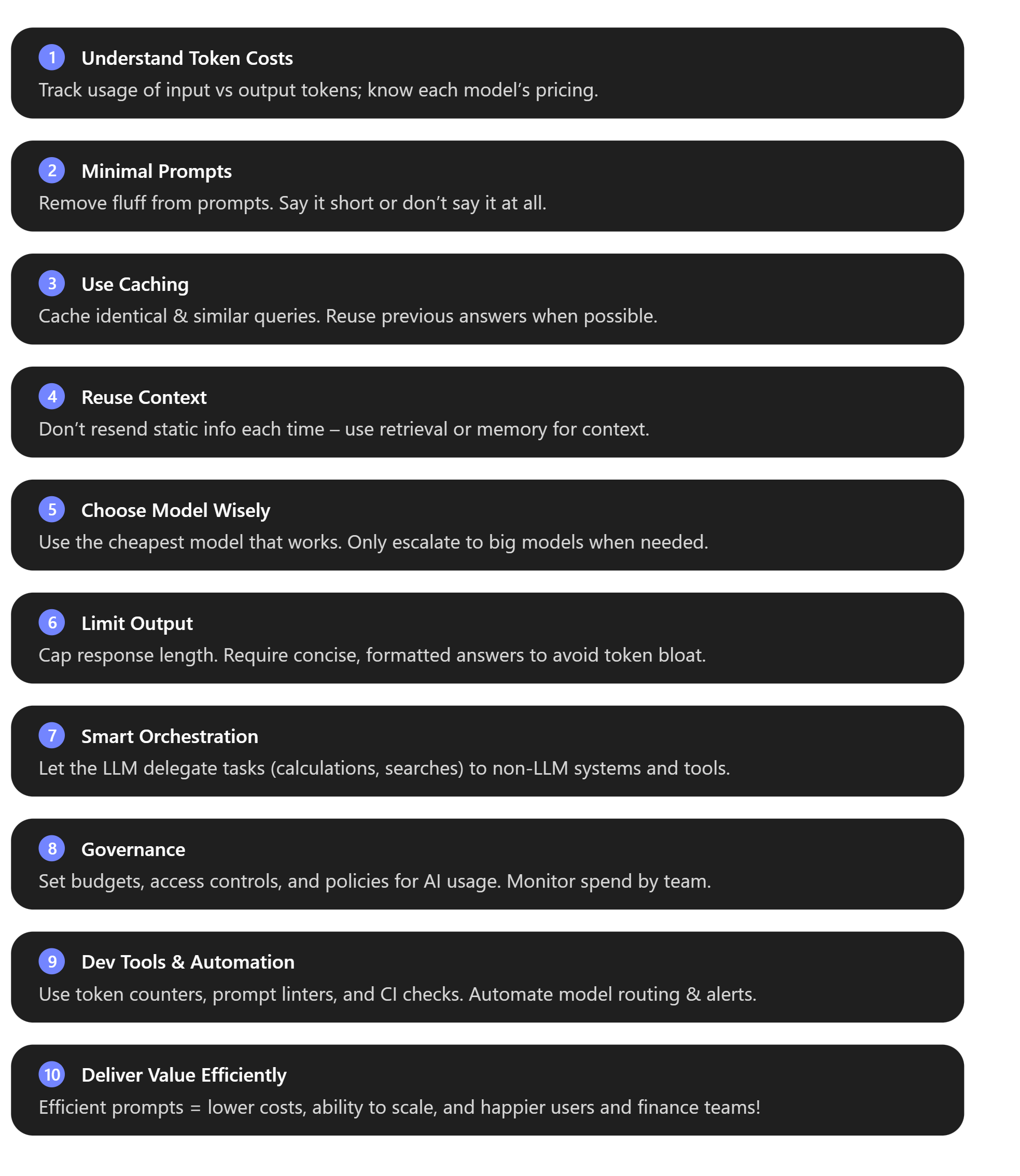
By following these guidelines, you can ensure your Azure AI Foundry applications are not only powerful but also cost-effective. In the rapidly evolving world of AI, those who manage to “start lean, scale smart, and own their token costs” will have a competitive edge – delivering great AI experiences at a fraction of the cost. Happy optimising! [finout.io]
 Cloud Computing with a side of Chipz